ImageLayered vs Image2Layer: Which Is Better?
ImageLayered vs Image2Layer compared on price per layer, PSD export, saved results, upload limits and free PSD tools, after testing both side by side.
 Image2Layer Team
You have a flat image and you want it in layers you can actually work with, ideally as a PSD you can open in Photoshop. ImageLayered and Image2Layer both promise image to layers, and their names sound alike, but they are very different products.
ImageLayered is a broad AI creative site: image generators, photo styles, video templates, and two layer tools among them. Image2Layer is built entirely around layers and PSD files. We ran the same images through both, and the differences show up in price per layer, in what you can download, and in whether your results are still there tomorrow.
Image2Layer is our product, so we have stuck to facts you can check on both sites, starting with price.
ImageLayered vs Image2Layer: Quick Comparison Table
| Feature | ImageLayered | Image2Layer |
|---|---|---|
| Core positioning | AI image and video site with two layer tools | ⚡ Dedicated AI image to layers, plus free PSD tools |
| Entry price | $9.99 for 45 named layers | 💰 $3.99 for 50 layers |
| Cost per named layer (packs) | 22.2¢ down to 12.5¢ | 💰 8.0¢ down to 5.6¢ |
| PSD export | Transparent PNG layers | 📤 Layered PSD, plus transparent PNG, JPG, WebP and ZIP |
| Saved results | Download right away; most tools keep no history | 🗂️ My results for 30 days, plus an email when layers are ready |
| Upload limit | PNG or JPEG up to 10 MB (Precision) | 📁 JPG, PNG or WebP up to 24 MB |
| Layer control | Pick a count; describe what to isolate | 🧩 Auto or 2 to 10; notes; split any layer again; Targeted Layer for one element |
| Welcome credits | 2 | 🎁 10, plus 17 free tools with no sign-in |
| Free PSD tools | Not offered | 📂 PSD viewer, PSD to PNG, JPG and PDF, PDF and AI to PSD, Quick PSD and more |
| Currency | US dollars | 🌍 Your local currency; Alipay and WeChat Pay for packs |
Core Positioning and Design Philosophy
ImageLayered: A Creative Playground With Layer Tools
ImageLayered is built around generation: GPT Image, Qwen Image and Nano Banana generators, photo styles, AI video and video templates. Layers are two tools in that menu. Precision Layers returns named layers at 2 credits per layer, and Quick Layers runs a one-click Qwen Image Layered split at 1 credit per layer.
The results come back as transparent PNG files, and because most of the site’s tools keep no saved history, its FAQ asks you to download them as soon as they are ready.
Image2Layer: Built Around Layers and PSD Files
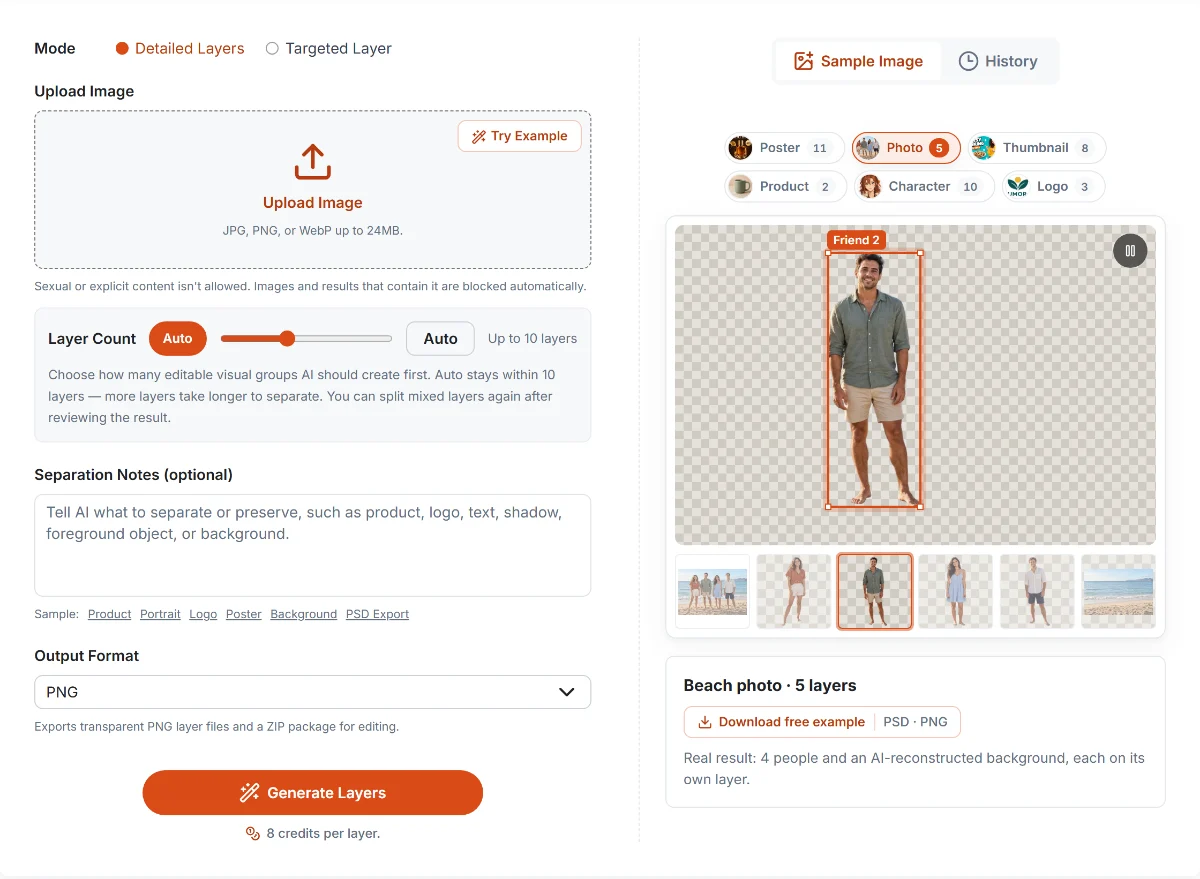
Image2Layer’s workspace with a real result: one beach photo, five layers (four people and the rebuilt background).
Everything on Image2Layer is designed for one job: getting from a flat image to layers you can keep editing.
Upload a JPG, PNG or WebP of up to 24 MB, leave the layer count on Auto or choose 2 to 10, add a note such as “keep the logo separate”, and get named layers with the hidden areas rebuilt, ready as a layered PSD. You pay 8 credits per layer delivered, and nothing for failed runs. If one layer still holds two things, split just that layer again; Targeted Layer pulls out a single element for a flat 16 credits.
Every result waits in My results for 30 days. Around the AI tool sit 17 free browser tools for everyday PSD work, from a PSD viewer to PDF and Illustrator to PSD.
Core Feature Comparison
📤 A Real Layered PSD, Not a Folder of PNGs
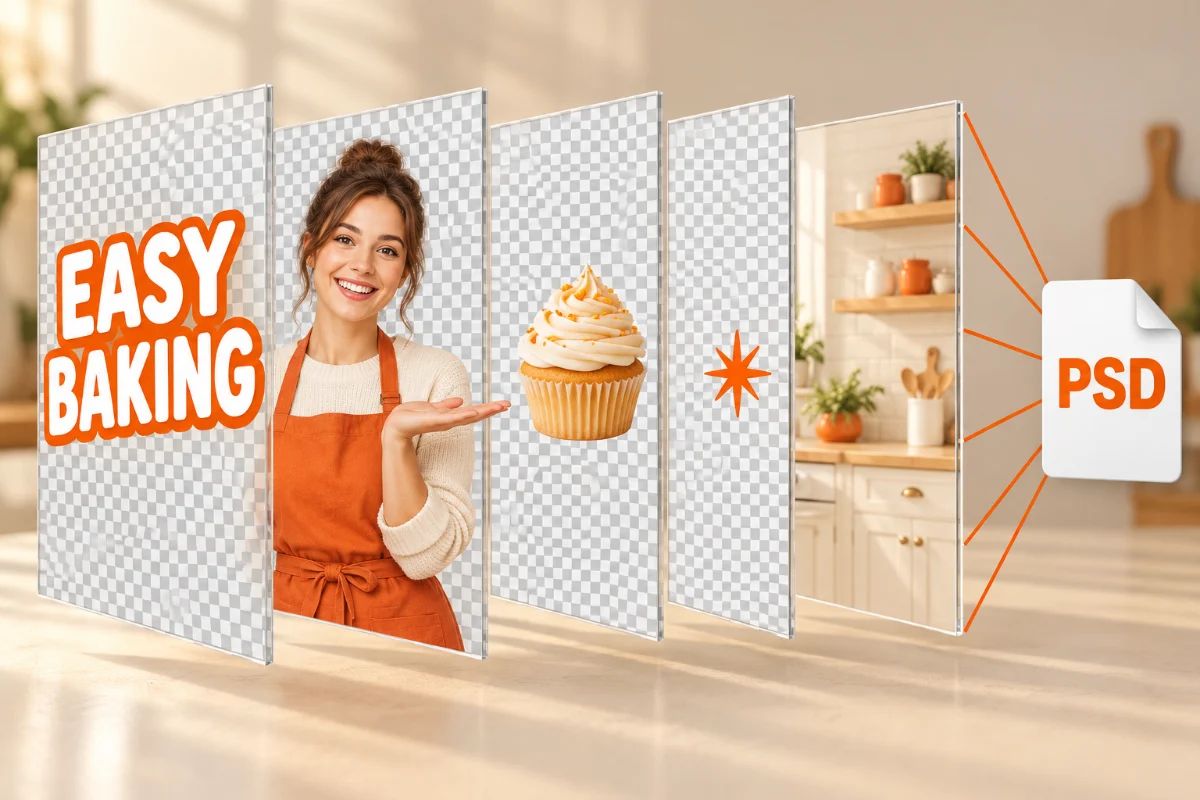
Image2Layer exports a layered PSD with every layer in position, so it opens in Photoshop, Photopea, Affinity Photo or GIMP ready to edit. You can also download transparent PNGs, JPG, WebP or a ZIP, and leave out any layers you switched off.
ImageLayered’s layer tools deliver transparent PNG layers, which you then rebuild into a document yourself.
Summary: If your next step is Photoshop, Image2Layer saves you the rebuilding.
🗂️ Results That Wait for You
Image2Layer keeps every separation in My results for 30 days, so you can download it again from any device. If you leave mid-run, it emails you when the layers are ready.
ImageLayered asks you to download straight away, because most of its tools keep no saved history.
Summary: With Image2Layer, closing the tab doesn’t mean losing your layers.
💰 Lower Price Per Layer
ImageLayered’s named layers cost 2 credits each, between 12.5¢ and 22.2¢ per layer depending on the pack. Image2Layer’s layers cost between 5.6¢ and 8.0¢ on packs, and about 4.7¢ on its yearly Studio plan.
Summary: Image2Layer’s layers cost roughly half as much, or less.
📁 Room for Bigger Files
Image2Layer accepts JPG, PNG and WebP up to 24 MB, more than twice the 10 MB PNG or JPEG limit of ImageLayered’s Precision mode, so high-resolution photos and print files go in without resizing.
Summary: Image2Layer takes your large files as they are.
📂 Free Tools for Everyday PSD Work
Image2Layer is free for everything around the AI: opening PSD files, exporting layers as PNGs, saving a PSD as a PDF, turning a PDF or Illustrator file into a PSD, or making a one-layer PSD with Quick PSD. New accounts also get 10 welcome credits, against ImageLayered’s 2.
Summary: Image2Layer covers your daily PSD work for free.
Pricing Comparison: Credit Packs Side by Side
Both tools sell one-off credit packs, which makes this the most direct comparison. ImageLayered’s figures below are for Precision Layers, its named-layer mode.
| Spend about | ImageLayered (Precision) | Image2Layer | You get with Image2Layer |
|---|---|---|---|
| $10 | $9.99 · 45 layers · 22.2¢ each | $7.99 · 112 layers · 7.1¢ each | 67 more layers for $2.00 less |
| $30 | $29.99 · 225 layers · 13.3¢ each | $16.99 · 262 layers · 6.5¢ each | 37 more layers for $13.00 less |
| $60 | $59.99 · 480 layers · 12.5¢ each | $44.99 · 800 layers · 5.6¢ each | 320 more layers for $15.00 less |
US-dollar list prices, checked October 20, 2026. ImageLayered’s packs are $9.99 for 90 credits, $29.99 for 450 and $59.99 for 960; Precision Layers costs 2 credits per layer. Image2Layer charges 8 credits per layer and also sells a $3.99 pack for 50 layers.
Even ImageLayered’s cheaper Quick mode, at 1 credit per layer, works out to 11.1¢, 6.7¢ and 6.2¢ per layer on those packs, still more than Image2Layer at every size.
ImageLayered: Packs and Subscriptions
Packs cost $9.99, $29.99 and $59.99, and their credits never expire. Subscriptions run from $24.90 a month for 450 credits, and their credits expire at the end of each period. Credits are shared with the site’s image and video tools.
Image2Layer: Lower Packs, Plus Plans for Regular Work
Packs cost $3.99 for 50 layers, $7.99 for 112, $16.99 for 262 and $44.99 for 800, valid for a year. Monthly plans start at $7.99 for 125 layers, and the yearly Studio plan brings the price down to about 4.7¢ per layer. Every job shows its maximum cost before you start, and you pay only for the layers delivered.
Summary: Image2Layer gives you more layers for less money at every pack size, with a real PSD at the end.
Scenario-Based Guide: Which Tool Should You Choose?
| Use case | Better choice | Why |
|---|---|---|
| You want a layered PSD to open in Photoshop | Image2Layer | 📤 Layered PSD export with every layer in place |
| You want to come back for your files later | Image2Layer | 🗂️ My results for 30 days |
| You separate images often and watch your budget | Image2Layer | 💰 5.6¢ to 8.0¢ per layer on packs |
| Your files are larger than 10 MB | Image2Layer | 📁 JPG, PNG and WebP up to 24 MB |
| You need just one element: a product, logo or subject | Image2Layer | 🎯 Targeted Layer for a flat 16 credits |
| You want only some layers in the download | Image2Layer | ✅ Switch layers off and download the rest as PSD or ZIP |
| You open, preview or convert PSD files all the time | Image2Layer | 📂 17 free browser tools, no sign-in, nothing uploaded |
| You pay in yen, euros, won or another local currency | Image2Layer | 🌍 Local-currency prices; ImageLayered charges in US dollars |
| You mainly want AI image and video generation | ImageLayered | Generators and video templates on one credit balance |
| You buy credits rarely and want them never to expire | ImageLayered | Its pack credits have no expiry date |
Final Verdict: ImageLayered or Image2Layer?
ImageLayered is a fun place to generate images and videos, with layer tools on the side. Image2Layer is built for people who need layers: it costs less per layer, exports a real layered PSD, keeps your results for 30 days, and takes bigger files in more formats.
Choose Image2Layer if layers and PSD files are the point. You get more layers for less money at every pack size, a document that opens ready to edit, and 17 free tools for the rest of your PSD work.
ImageLayered makes sense mainly if AI image and video generation is your main use, and layers are an occasional extra.
The bottom line after testing both: if you are making AI videos and want to split an image now and then, ImageLayered’s credits cover both. If you need clean, named layers in a PSD from product shots, thumbnails and AI art, Image2Layer does it better and for less. Open Image2Layer and try it on your own image.
Related Guides and Tools
- ImageToPSD vs Image2Layer, ImageToLayers vs Image2Layer and ImageToLayer.com vs Image2Layer compare the other popular options.
- How to turn a flat image into a layered PSD walks through the whole workflow.
- Image layer separation vs background removal explains when a simple cut-out is enough.
- See current prices on the pricing page, and every free and AI tool in all tools.
FAQ About ImageLayered vs Image2Layer
Is Image2Layer cheaper than ImageLayered?
Yes. ImageLayered’s named-layer mode, Precision Layers, costs 2 credits per layer, which works out to 22.2, 13.3 and 12.5 cents per layer on its $9.99, $29.99 and $59.99 packs. Image2Layer charges 8 credits per layer: 8.0 cents on its $3.99 pack and down to 5.6 cents on its $44.99 pack. Even ImageLayered’s cheaper Quick mode costs more per layer than Image2Layer at every pack size.
Does ImageLayered export PSD files?
ImageLayered’s layer tools deliver transparent PNG layers. Image2Layer exports a layered PSD with every layer in place, as well as transparent PNGs, JPG, WebP and a ZIP.
How long are my results saved?
Image2Layer keeps every separation in My results for 30 days, so you can come back and download again, and it emails you when a run finishes after you have left the page. ImageLayered’s own FAQ advises downloading results as soon as they are ready, because most of its tools do not keep a saved history.
Can I try either tool for free?
Image2Layer gives new accounts 10 welcome credits, and its 17 browser tools, including the PSD viewer, PSD to PNG and Quick PSD, are free with no sign-in. ImageLayered gives new accounts 2 welcome credits.
Which tool accepts bigger files?
Image2Layer accepts JPG, PNG and WebP files up to 24 MB. ImageLayered’s Precision Layers mode accepts PNG and JPEG files up to 10 MB.
Is ImageLayered the same as Image2Layer?
No. ImageLayered (imagelayered.com) and Image2Layer (image2layer.com) are separate products from different teams, with different prices and features.
Experimente o Image2Layer com sua própria imagem
Envie uma imagem JPG, PNG ou WebP e exporte camadas editáveis, assets PNG transparentes ou um PSD em camadas.
Abrir o Image2Layer