How to Open a PSD File Without Photoshop
Open a PSD file without Photoshop on Windows, Mac, iPhone or Android. Compare free viewers and editors, and fix PSDs that open blank or show odd colors.
 Image2Layer Team
You have a .psd file, no Photoshop license, and someone waiting for an answer. You rarely need Photoshop just to look at a PSD, check its layers or pull a PNG out of it. The right tool depends on one question: do you need to see the file, export something from it, or edit it?
This guide covers free options for Windows, Mac, iPhone and Android, compares what each one keeps, and explains why some PSDs open blank everywhere except Photoshop. If the format itself is new to you, start with what a PSD file is.
Quick Answer
- Just view it, on any device: open the free PSD Viewer in your browser. It reads PSD and PSB files up to 500 MB, lets you switch layers on and off, and lists the fonts the file uses. No sign-in, no credits, and the file is not uploaded.
- Edit the layers for free: Photopea in the browser, or GIMP, Krita or Affinity on a computer.
- Quick look on a Mac: select the file in Finder and press Space, or open it in Preview. You see the flat picture only.
- Windows: nothing built in opens a PSD. Use a browser tool or install a free editor.
- Phone or tablet: use a browser-based viewer, or Adobe’s Photoshop app if you have an Adobe account.
First Decide: View, Export or Edit?
| Your goal | What you need | Free choice |
|---|---|---|
| See the design and its layers | A viewer that reads layer data | PSD Viewer, Photopea |
| Get a PNG, JPG or PDF | A converter | PSD to PNG, PSD to JPG, PSD to PDF |
| Change text or move layers | An editor that imports PSD | Photopea, GIMP, Krita, Affinity |
| Send an edited PSD back | An editor that also saves PSD | Photopea, GIMP, Krita, Affinity (with losses) |
Viewing changes nothing in the file. Editing in a non-Adobe app is where text, smart objects and effects can get converted, so keep the original untouched.
Open a PSD in Your Browser With the Free PSD Viewer
A browser-based viewer works the same on Windows, macOS, ChromeOS, Linux, iPhone and Android, and it suits work computers where you can’t install software.
- Open the PSD Viewer and drop your file onto the page, or choose it from your device. PSD and PSB files up to 500 MB are supported. The file is read by your browser and is never uploaded.
- Check the layers. The layer list follows Photoshop’s order, top to bottom, with groups. Click the eye next to a layer or group to hide it and the picture is redrawn without it, so you can see what sits behind a headline or whether the background is a separate layer.
- See which fonts the file uses. The viewer lists the fonts named in the file’s text layers. If you plan to edit the text in another program, this tells you which fonts to install or license first.
- Save what you need. The viewer saves the current view as a PNG or JPG, the selected layer as a PNG, or all visible layers as a ZIP. For batches and more options, use the free converters: PSD to PNG for transparent images or every layer, PSD to JPG for small shareable previews, and PSD to PDF for review copies.
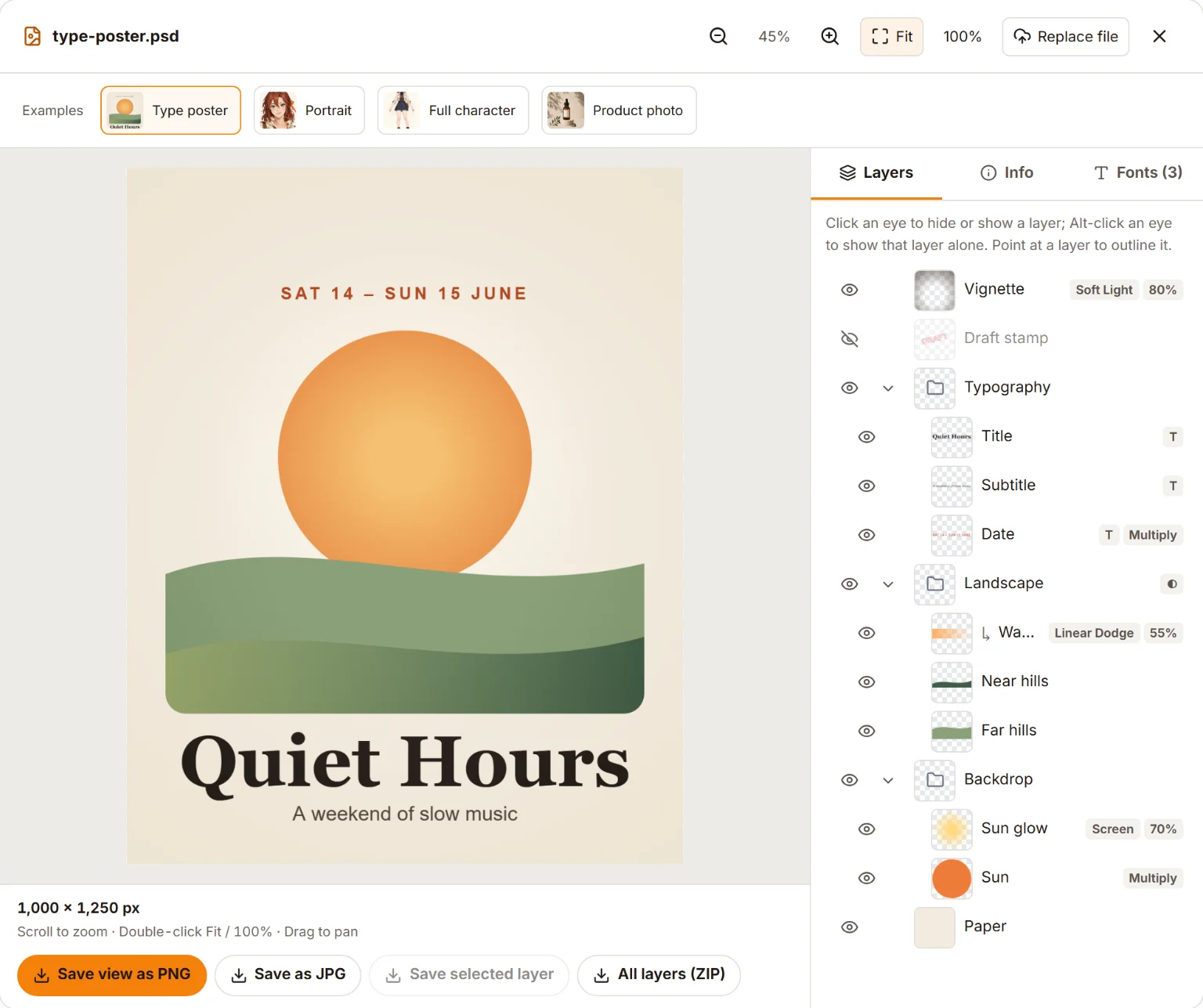
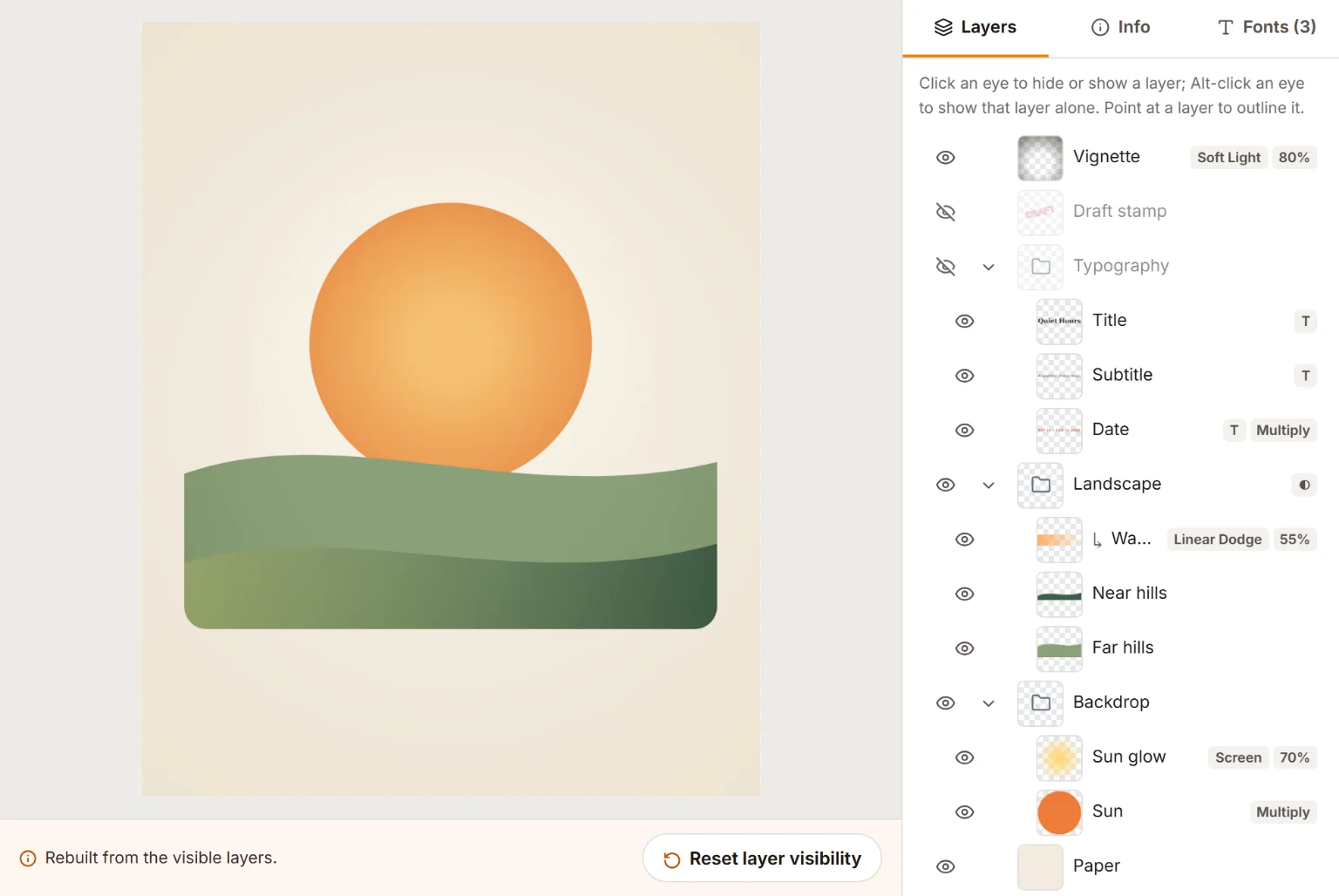
A sample PSD in the free PSD Viewer, as it was saved (top) and with its Typography group switched off (bottom). Hiding a group is the fastest way to see what a file is made of.
The viewer is read-only: it doesn’t edit pixels or text, and it doesn’t save a new PSD. For changes, use one of the editors further down.
When the Picture Is Rebuilt From Layers
If a file was saved without its ready-made flat picture, the viewer composes the picture from the layers and tells you it did. Most designs look the same either way, but layer styles, adjustment layers and smart filters may differ from Photoshop in a rebuilt picture. The troubleshooting section explains why files end up like this.
Ways to Open a PSD Without Photoshop, Compared
Every option below can at least show the picture. Third-party details were checked against each maker’s documentation in October 2026; features change between versions.
| Option | Runs on | Cost | Layers | Editable text | PSB | Your file |
|---|---|---|---|---|---|---|
| Image2Layer PSD Viewer | Any modern browser | Free, no sign-in | View, show or hide | No (lists fonts) | Yes, up to 500 MB | Stays on your device |
| Photopea | Any modern browser | Free with ads | Edit | Yes, if fonts are available | Yes | Processed in the browser |
| GIMP 3 | Windows, macOS, Linux | Free, open source | Edit | No, text becomes pixels | Yes | Local app |
| Krita | Windows, macOS, Linux | Free, open source | Edit | Limited | Opens, can’t save | Local app |
| Affinity | Windows, macOS | Free with a Canva account | Edit | Yes, with an import option | Opens, can’t save | Local app |
| macOS Preview, Quick Look | Mac | Built in | Flat picture only | No | Not documented | Local |
| Windows Photos, Paint | Windows | Built in | No PSD support | No | No | Local |
| Photoshop mobile app | iPhone, Android phones | Free download, some features paid | Edit | Yes | Check the app | Adobe account needed |
| Google Drive, OneDrive | Browser | Free storage tier | Flat preview only | No | Not documented | Uploaded to the cloud |
How to Open a PSD File on Windows
Windows 10 and 11 can’t display PSD files out of the box. Photos and Paint don’t read the format, and File Explorer shows a generic icon instead of a thumbnail. You have four practical routes:
- A browser. Open the PSD Viewer in Edge or Chrome. Nothing is installed or uploaded.
- A free editor. GIMP, Krita and Affinity all have Windows versions that read PSD layers (see the editing section below).
- Adobe Bridge. Adobe’s file browser is a free download with an Adobe account and shows PSD thumbnails and previews, which helps when you are searching a folder of files.
- Thumbnail extensions. Third-party add-ons can make File Explorer draw PSD thumbnails; install them only from vendors you trust. Most read the flat copy stored in the file, so a PSD saved without Maximize Compatibility can still look blank.
How to Open a PSD File on a Mac
macOS can show a PSD without any extra software:
- Quick Look: select the file in Finder and press the Space bar.
- Preview: right-click the file, choose Open With → Preview. To save a copy, choose File → Export and pick PNG, JPEG or PDF.
Both show the flattened picture only: no layer list, no layer names, no fonts. If the file was saved without its flat copy, Preview may show an empty image even though the layers are fine. To see the layers, open the PSD Viewer in Safari or Chrome, or use one of the editors below.
How to Open a PSD File on iPhone, iPad or Android
On a phone, the browser is again the simplest route. Open the PSD Viewer in Safari or Chrome, tap to choose a file, and pick the PSD from Files, your downloads or a cloud drive app. Tap an eye icon to hide a layer.
Phones have far less memory than computers, so the viewer asks before it opens a file over 100 MB on a phone, and a document with huge pixel dimensions can fail there even under the 500 MB limit. Open it on a computer instead, or ask the sender for a flattened PNG or JPG.
Other options on mobile:
- Photoshop for iPhone and Android. Adobe’s mobile Photoshop app opens PSD files with layers. You sign in with an Adobe account, and some features require a paid plan.
- Cloud previews. Google Drive and OneDrive can show a flat preview of a PSD after you upload it. You see the picture only, and your file now lives on that service.
How to Edit a PSD Without Photoshop
To change layers you need an editor that imports PSD. None supports every Photoshop feature, so work on a copy.
Photopea (Browser)
Photopea looks and works much like Photoshop, opens PSD and PSB files, and saves back to PSD. Text layers stay editable when the font is available on your computer; otherwise Photopea substitutes one. It is free with ads, and Photopea states that files are processed on your device rather than uploaded.
GIMP 3 (Windows, macOS, Linux)
GIMP imports PSD layers, groups and masks, and since version 3.0 it opens PSB files and CMYK PSDs. GIMP 3.2 also imports more layer styles, such as drop shadows and outer glows. Text layers arrive as pixels, and adjustment layers and smart objects don’t come across as editable features.
Krita (Windows, macOS, Linux)
Krita is built for painting and illustration, and it opens PSD and PSB files with layers, groups and masks. It saves PSD but not PSB, and some Photoshop-specific features are converted or dropped.
Affinity (Windows, macOS)
Affinity is now free with a Canva account. It opens PSD and PSB files with layers. An import setting keeps PSD text as editable text, and smart objects can stay editable as embedded documents. When you export back to PSD, text is rasterized, so treat that as a one-way trip.
Whichever editor you use, compare the result against the original before you send it back. Check the text, effects and blend modes in particular.
Troubleshooting: PSD Opens Blank, Looks Wrong or Won’t Open
The Preview Is Blank or White
A PSD holds its layers and, optionally, one flat copy of the finished picture. Photoshop writes that copy only when Maximize PSD and PSB File Compatibility is on. Thumbnails, Quick Look, Preview and many converters read only the flat copy, so a file saved without it can look empty.
- If you have Photoshop: open Edit → Preferences → File Handling (on a Mac, Photoshop → Settings → File Handling), set Maximize PSD and PSB File Compatibility to Always, then save the file again.
- If you don’t: open it in the PSD Viewer, which rebuilds the picture from the layers and labels it as rebuilt. You can also ask the sender to re-save it with the setting above.
The Colors Look Off
Print designs are often saved in CMYK, while screens and most viewers work in RGB. Every app converts CMYK to screen colors a little differently, so the same file can look duller or more saturated from one program to the next. Our PSD tools convert CMYK to screen colors with a standard formula: fine for checking layout and content, not for judging print color. If you need consistent screen colors, ask for an RGB copy, or convert a duplicate in Photoshop with Image → Mode → RGB Color. Lab, Duotone and Multichannel files don’t open in our tools yet, so convert a copy to RGB first. A 16-bit CMYK file opens only if it was saved with Maximize Compatibility, and its layers can’t be shown or exported one by one yet; converting a copy to 8 bits per channel fixes both.
It Looks Too Dark, Too Bright or Won’t Open at All
Retouched photos are often 16 bits per channel, and HDR work can be 32 bits. Some viewers only handle 8-bit files, and 32-bit images need tone mapping before they look right on screen. Our PSD tools open 16- and 32-bit files and save 8-bit images, which is what web formats use anyway. If another app struggles, convert a copy in Photoshop with Image → Mode → 8 Bits/Channel.
The File Is Huge
A PSD can be up to 30,000 pixels on a side and 2 GB. Larger documents are saved as PSB, Photoshop’s Large Document Format, which allows up to 300,000 pixels per side. Our free PSD tools accept PSD and PSB files up to 500 MB and up to 32,000 pixels on a side, or 100 megapixels in total on a computer (phones get a lower limit). File size isn’t the only limit: memory use grows with the pixel dimensions and the number of layers. For an oversized file, ask for a flattened PNG or a reduced copy.
The Fonts Look Different
A text layer stores the font’s name, not the font itself. An editor that redraws the text without that font installed substitutes another one. The viewer shows text exactly as it was saved in the file, and its font list tells you what to install before editing elsewhere.
“Not a Valid Photoshop Document”
Every genuine PSD starts with the same four-byte signature, 8BPS. If a file is rejected, it may be a PNG or JPG that was simply renamed to .psd, or the download was cut short. Compare the file size with the sender’s copy, download it again, or ask for it zipped.
Need a PNG, JPG or PDF Instead?
Often the real task is to get a picture everyone can open. These free tools run in your browser with nothing uploaded:
- PSD to PNG keeps transparency and saves the whole picture, every layer in a ZIP, or both, for up to 50 files at once, at 100%, 50% or 25% size. Our guide on how to export PSD layers as PNG walks through the options.
- PSD to JPG makes smaller files for email and quick reviews.
- PSD to PDF gives reviewers a document they can open anywhere.
Going the other way, from a flat picture to a PSD? PNG to PSD can wrap a picture in a one-layer PSD for free, or use AI to split it into separate, editable layers, as Image to Layers does. AI separation uses credits; the free PSD tools above don’t. Browse everything in all tools.
FAQ About Opening PSD Files
What is the easiest way to open a PSD file without Photoshop?
Open a browser-based PSD viewer and drop the file in. Image2Layer’s free PSD Viewer works on Windows, Mac, Chromebooks and phones, shows the layers and the fonts the file uses, and reads the file in your browser without uploading it.
Is there a free PSD viewer that shows layers?
Yes. Image2Layer’s PSD Viewer lists every layer and group and lets you switch each one on and off. The free editors Photopea, GIMP, Krita and Affinity show layers too; macOS Preview shows only the flat picture.
Can I open a PSD on Windows 11 without installing anything?
Not with the built-in apps: Photos and Paint do not read PSD files. A browser is enough, though. Open a PSD viewer in Edge or Chrome and choose the file; nothing is installed.
Why does my PSD look blank in thumbnails or in Preview?
The file was probably saved with Maximize Compatibility turned off, so it has layers but no ready-made flat picture, which is all that thumbnails and Preview read. Re-save it in Photoshop with Maximize Compatibility set to Always, or open it in a tool that rebuilds the picture from its layers.
Can I edit the text in a PSD without Photoshop?
Often, yes. Photopea edits PSD text layers, and Affinity can import PSD text as editable text. You need the same fonts installed, otherwise the editor substitutes another font. GIMP imports text layers as pixels.
How do I open a PSB file without Photoshop?
PSB is Photoshop’s large document format. Image2Layer’s PSD Viewer opens PSB files up to 500 MB in the browser, and Photopea, GIMP 3, Krita and Affinity can open PSB files too. Very large documents need a lot of memory, so a computer works better than a phone.
Is it safe to open a client’s PSD in an online tool?
It depends on whether the tool uploads the file. Image2Layer’s free PSD tools and Photopea process the file inside your browser. Cloud previews such as Google Drive or OneDrive require uploading it. Check the tool’s privacy page before using confidential work.
Will opening a PSD in another program change it?
Viewing never changes the file. Saving over it from a non-Adobe editor can drop or convert features such as smart objects, adjustment layers or editable text. Always save edits as a copy and keep the original PSD.
Try Image2Layer with your own image
Upload a JPG, PNG, or WebP image and export editable layers, transparent PNG assets, or a layered PSD.
Open Image2Layer