Image to Layered PSD Tools Compared (2026)
Image to layered PSD tools compared in 2026: Image2Layer, LayerPSD, Image Layered, Canva Magic Layers, Photoshop and Photopea on price, layers and PSD export.
 Image2Layer Team
Updated October 2026 · Prices and features checked on each tool’s own site on October 28, 2026
The short answer: to turn a JPG or PNG into a genuinely layered PSD, use an AI image to layers tool. Image2Layer has the lowest price per layer of the pay-as-you-go packs here, from $3.99 with no subscription, plus a free image to PSD trial. LayerPSD is the pick when text must stay editable, Canva Magic Layers suits work that stays inside Canva, and Photoshop or Photopea are for separating every element by hand.
Saving a picture “as PSD” does not give you layers. Photoshop and Photopea will both open a JPG as a PSD, but it arrives as one flat layer: the headline, the product and the background are still welded together. A layered PSD needs each element cut onto its own transparent layer, and the area behind it filled in, so you can move one thing without leaving a hole.
We compared six ways to get there, using only what each tool states on its own site, so you can check every number. Image2Layer is our product, so it comes first, and we have kept to facts rather than adjectives.
Image to Layered PSD Tools: Quick Comparison
| Feature | Image2Layer | LayerPSD | Image Layered | Canva Magic Layers | Photoshop | Photopea |
|---|---|---|---|---|---|---|
| What it is | ⚡ AI image to layers, in the browser | AI layer splitter with editable text | AI layer splitter with a browser PSD editor | AI layers inside a Canva design (beta) | Desktop editor, manual separation | Free browser editor, manual separation |
| Layered PSD export | ✅ Layered PSD, transparent PNGs, ZIP | PSD, PSD with editable text, PNG ZIP, PPTX | PSD and PNG ZIP | No PSD download | Yes, layers made by hand | Yes, layers made by hand |
| Hidden background | ✅ Rebuilt automatically | Repainted automatically | Rebuilt automatically | Not stated | Generative Fill or Remove Tool, per hole | Clone and heal by hand |
| Free option | 🎁 Free image to PSD trial | One free try with a Gmail sign-in | None for AI splits | Shared monthly AI allowance on Canva Free | None (free Firefly web editing only) | Free with ads |
| Entry price | 💰 $3.99 pack, no subscription | $9.90 pack | $9.90 pack | Canva Pro for a bigger AI allowance | US$22.99/month | Free |
| How you pay | ✅ 8 credits per layer, only for layers delivered | 1 credit per output on its fast model | Flat 5 credits per split | Counts against your AI uses | Subscription plus your time | Your time |
| Best for | 🎯 Layered PSDs from everyday images at the lowest pack price per layer | Posters whose text must stay editable | Heavy monthly use at a flat split price | Designs you keep editing in Canva | Pixel-perfect manual work | Occasional manual edits at no cost |
US-dollar prices as listed on each site on October 28, 2026. Image2Layer shows local-currency prices in many countries.
The Tools, One by One
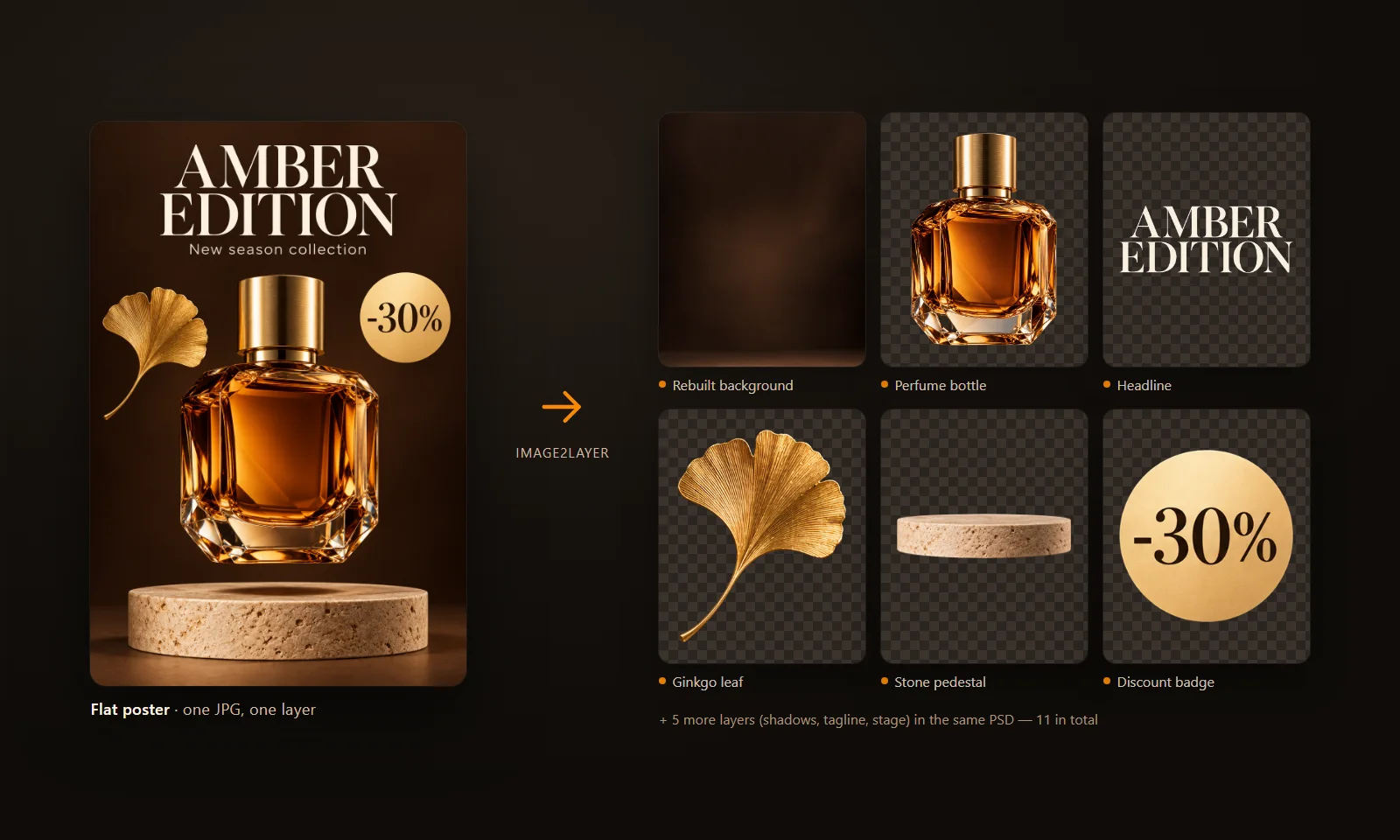
A real Image2Layer result: one flat perfume poster, eleven layers in the PSD, with the background rebuilt behind the bottle and the pedestal.
Image2Layer: Layered PSDs at the Lowest Pack Price per Layer
Image2Layer turns a flat JPG, PNG or WebP into a layered PSD in about 1 to 2 minutes. You upload an image of up to 24 MB (at least 512 × 512 pixels), leave the layer count on Auto or choose 2 to 10 layers, and get each element on its own transparent layer with the hidden background rebuilt. The PSD opens in Photoshop, Photopea and Affinity Photo, and the same result downloads as transparent PNGs or a ZIP.
You pay only for what you need. Splitting costs 8 credits per layer, charged for the layers actually delivered, and failed jobs never use credits. Credit packs start at $3.99 with no subscription, and paid exports carry no watermark and can be used commercially. When one layer still holds two things, you split that layer again; when you only want one object, such as a product, logo or person, Targeted Layer lifts it out on its own for a flat 16 credits. There is a free image to PSD trial, so you can see the layers from your own picture before you buy.
Across real jobs on Image2Layer, the average separation has 3.2 layers and 86% have four or fewer, which is why a 10-layer run plus “split again” covers almost every product shot, thumbnail, portrait and poster.
Best for: anyone who wants clean layered PSDs from everyday images and the lowest pack price per layer, with a free trial first. Try Image to PSD.
LayerPSD: When Text Must Stay Editable
LayerPSD is an AI layer splitter that exports a layered PSD, a ZIP of PNGs or a PowerPoint file, with the background repainted behind each element. Its decisive strength is text: recognized lettering can come back as native, editable Photoshop type.
It sells one-off credit packs from $9.90 for 100 credits ($0.099 each) to $49.90 for 700 ($0.071 each), valid for 12 months. On its fast model one credit buys one output image, and the rebuilt background counts as an output; its higher-quality model uses about 6.7 credits per output. There is one free try after signing in with a Gmail account.
Best for: posters and thumbnails where you need to retype the headline in Photoshop.
Image Layered: A Flat Price per Split
Image Layered splits a JPG, PNG or WebP of up to 10 MB into layers, rebuilds the background and exports a PSD with a PNG ZIP, plus a browser editor for working on the result. Its decisive strength is the pricing model: a split costs a flat 5 credits however many layers it returns, which suits busy images on its monthly plan.
The entry pack is $9.90 for 40 credits, or 8 splits ($1.24 a split); the $16.90 monthly plan gives 500 credits a month. AI splitting needs a signed-in account with credits; its own FAQ says only uploading and arranging layers is free. Text comes back as pixels.
Best for: people who split a lot of crowded images every month.
Canva Magic Layers: Layers That Stay in Canva
Canva Magic Layers, still in beta, separates a flat PNG or JPG into elements you can move, resize, delete and retype inside a Canva design. Its decisive strength is that editing flow: fix a typo or change a font without leaving Canva.
The layers stay in Canva. Canva’s download types are JPG, PNG, PDF, SVG, PPTX, GIF and MP4, so there is no layered PSD to hand off. Canva says it works best on graphic designs and illustrations, that photo-realistic images may not separate as cleanly, and that images over 5,000 pixels on the longest edge are not supported. Magic Layers is a Premium AI tool on Canva’s shared allowance: up to 20 uses a month on Canva Free, up to 200 on Pro.
Best for: graphics you will finish and publish from Canva.
Adobe Photoshop: Full Control, by Hand
Photoshop can save any JPG as a PSD, but the file has one layer. To separate it you select each element with Select Subject or Object Selection, copy it to its own layer, and fill the hole behind it with Generative Fill or the Remove Tool, one element at a time. Its decisive strength is control: every edge, mask and fill is yours to perfect.
Photoshop comes only with a paid Creative Cloud plan, from US$22.99 a month (annual, billed monthly) for Photoshop alone, with generative credits included each month.
Best for: final, pixel-perfect work where you are happy to spend the time. You can also split the image in Image2Layer first and refine the layers in Photoshop.
Photopea: Free, but Manual
Photopea is a free browser editor with ads that opens every JPG or PNG as a PSD document. Like Photoshop, it gives you one layer to start with, and you separate the parts yourself with its selection, mask and clone tools.
Best for: occasional manual edits when you have the time and no budget.
GenPsd is also worth knowing: it advertises free AI layer separation and editable text layers in the browser with no sign-up, though it does not state layer limits or whether it rebuilds the background.
What a Layered PSD Really Costs
Price is where these tools differ most. Here is what one typical split, the background plus four elements, costs on each site’s own list prices.
| Tool | How it bills | Smallest pack | Largest pack |
|---|---|---|---|
| Image2Layer | 8 credits per delivered layer | 💰 $0.40 ($3.99 pack) | 💰 $0.28 ($44.99 pack) |
| LayerPSD (fast model) | 1 credit per output, background included | $0.50 ($9.90 pack) | $0.36 ($49.90 pack) |
| Image Layered | Flat 5 credits per split | $1.24 ($9.90 pack) | $1.04 ($24.90 pack) |
One split = the rebuilt background plus four elements, five layers in all. Prices listed on each site on October 28, 2026. Canva, Photoshop and Photopea are left out because they do not price a split.
Per layer, Image2Layer’s packs work out to 8.0¢ ($3.99 for 400 credits), 7.1¢ ($7.99), 6.5¢ ($16.99) and 5.6¢ ($44.99). If you separate images every week, the Starter plan at $7.99 a month gives 1,000 credits, about 6.4¢ a layer, and yearly plans bring it down to about 5.3¢. Image Layered’s flat price pulls ahead only on its subscriptions: its $16.90 monthly plan gives 500 credits, about 17¢ a split whatever the layer count, which pays off if you split many crowded images every month.
Summary: Image2Layer has the lowest entry price and the lowest cost per layer of the tools that bill per layer, with no subscription needed, and you never pay for a failed job.
Which Tool Should You Pick?
| If you need to… | Pick | Why |
|---|---|---|
| Turn a JPG or PNG into a layered PSD on a budget | Image2Layer | 💰 From $3.99, the lowest pack price per layer here |
| Try it on your own image before paying | Image2Layer | 🎁 Free image to PSD trial |
| Split product shots, thumbnails, portraits and posters | Image2Layer | ⚡ Auto or 2–10 layers, background rebuilt, about 1–2 minutes |
| Lift out just one product, logo or person | Image2Layer | 🎯 Targeted Layer, a flat 16 credits |
| Get PNG layers and a ZIP as well as the PSD | Image2Layer | 📤 Every format from the same result |
| Retype the headline as live Photoshop text | LayerPSD | Recognized text exported as type layers |
| Keep editing the design in Canva | Canva Magic Layers | Layers stay inside the Canva editor |
The Bottom Line
Every tool here can end with a layered PSD, but only the AI splitters do the separating for you, and they differ most on price. For most images, the product shots, thumbnails, posters and AI art that need a handful of clean layers, Image2Layer gives you a real layered PSD with the background rebuilt, for the lowest pack price per layer and with a free trial to start. Pick LayerPSD when the text must stay editable, Canva when the design lives in Canva, and Photoshop when you want to perfect every edge yourself, ideally starting from layers Image2Layer has already split. Open Image2Layer and try it on your own image.
Related Guides and Tools
- Image to PSD, JPG to PSD and PNG to PSD convert your file into a layered PSD.
- Separate image into layers covers splitting photos, posters and illustrations.
- How to separate an image into layers compares doing it by hand in Photoshop, Photopea or GIMP with doing it in one step with AI.
- How to turn a flat image into a layered PSD walks through checking the exported layers.
- One-on-one comparisons: ImageToPSD vs Image2Layer, ImageToLayers vs Image2Layer, ImageToLayer.com vs Image2Layer and ImageLayered vs Image2Layer.
- See current prices on the pricing page.
FAQ About Image to PSD Tools
What is the best tool to convert a JPG to a layered PSD?
For most people, an AI image-to-layers tool such as Image2Layer: upload the JPG, leave the layer count on Auto or pick 2 to 10 layers, and download a layered PSD with the hidden background rebuilt, in about 1 to 2 minutes. It charges 8 credits per layer, from 5.6¢ to 8.0¢ a layer on credit packs that start at $3.99 with no subscription. Choose LayerPSD if recognized text must come back as editable type, and Photoshop if you want to cut every edge by hand.
Is there a free image to PSD converter with layers?
Yes. Image2Layer offers a free image to PSD trial, so you can split your own image into layers before you buy anything. Photopea is free too, but it only opens a JPG as a one-layer PSD; you separate the parts by hand. GenPsd advertises free AI layer separation with no sign-up. Canva Magic Layers draws on a small monthly AI allowance on Canva Free, but Canva cannot download a PSD.
Can Photoshop convert a JPG into a layered PSD?
Not automatically. Saving a JPG as a PSD in Photoshop gives you a file with one layer. To get separate layers you select each element (Select Subject or Object Selection), copy it to its own layer and fill the hole it leaves with Generative Fill or the Remove Tool. That gives full control, but it is manual work on every image and needs a paid Creative Cloud plan, from US$22.99 a month for Photoshop alone.
What is the difference between saving an image as PSD and a layered PSD?
Saving as PSD only changes the file format: the picture stays one flat layer. A layered PSD has each element, such as the subject, the text, the logo and the background, on its own transparent layer, so you can move, hide or replace one without touching the rest. Image to layers tools create those layers and rebuild the background that was hidden behind each object.
Which image to PSD tool is cheapest per layer?
Among the per-layer tools, Image2Layer: 8 credits per layer works out to 8.0¢ on the $3.99 pack, 7.1¢ on $7.99, 6.5¢ on $16.99 and 5.6¢ on $44.99, and about 5.3¢ on a yearly plan. LayerPSD lists $0.099 down to $0.071 per output on its fastest model, with the background counted as an output. Image Layered charges a flat 5 credits per split instead, which is $1.24 a split on its $9.90 entry pack.
Do image to PSD tools make the text editable?
Image2Layer puts text on its own pixel layer, so you can move, hide or recolor the words independently, and retype them in Photoshop if the wording must change; Image Layered works the same way. LayerPSD exports recognized text as Photoshop type layers, GenPsd exports editable text layers, and Canva Magic Layers lets you retype text inside Canva.
Can I export a PSD from Canva Magic Layers?
No. Magic Layers separates an image into editable elements inside a Canva design, but Canva’s download types are JPG, PNG, PDF, SVG, PPTX, GIF and MP4, with no PSD. If you need a layered Photoshop file, use an image to PSD tool such as Image2Layer.
Does Image2Layer rebuild the background behind objects?
Yes. Image2Layer fills in the area hidden behind each separated element, so moving or deleting the subject leaves a complete background instead of a hole. The layered PSD opens in Photoshop, Photopea and Affinity Photo, and the same result downloads as transparent PNGs or a ZIP.
Try Image2Layer with your own image
Upload a JPG, PNG, or WebP image and export editable layers, transparent PNG assets, or a layered PSD.
Open Image2Layer